Adding python development guide #4976
+240
−0
There are no files selected for viewing
This file contains hidden or bidirectional Unicode text that may be interpreted or compiled differently than what appears below. To review, open the file in an editor that reveals hidden Unicode characters.
Learn more about bidirectional Unicode characters
| Original file line number | Diff line number | Diff line change | ||||
|---|---|---|---|---|---|---|
| @@ -0,0 +1,240 @@ | ||||||
| # How-To: Develop Components in Python | ||||||
|
|
||||||
| This guide is a starting point for developing Python-based F Prime applications by constructing select components using Python. | ||||||
|
|
||||||
|
|
||||||
| `fprime-python` exposes F Prime and its standard components as a Python extension. It autocodes bindings to components written withing Python allowing them to be called from the larger system. This allows developers to write components in Python while still leveraging the F Prime framework and its ecosystem of tools and libraries. | ||||||
|
|
||||||
| For a working reference project, see the [F Prime Python Reference](https://github.com/fprime-community/fprime-python-reference). | ||||||
|
|
||||||
| --- | ||||||
|
|
||||||
| ## Contents | ||||||
|
|
||||||
| - [When to Use This](#when-to-use-this) | ||||||
| - [Prerequisites](#prerequisites) | ||||||
| - [Python in F Prime](#python-in-f-prime) | ||||||
| - [Modeling](#modeling) | ||||||
| - [Project Structure](#project-structure) | ||||||
| - [Development Environment](#development-environment) | ||||||
| - [Development Workflow](#development-workflow) | ||||||
| - [Testing](#testing) | ||||||
| - [Packaging and Distribution](#packaging-and-distribution) | ||||||
| - [Integration with Flight Components](#integration-with-flight-components) | ||||||
| - [Debugging](#debugging) | ||||||
| - [Next Steps](#next-steps) | ||||||
|
|
||||||
| ## When to Use This | ||||||
|
|
||||||
| Use this guide when you are: | ||||||
|
|
||||||
| - Have existing Python code that you wish to integrate into an F Prime project | ||||||
| - Want to explore F Prime development through Python | ||||||
| - Need to rapidly prototype components or utilities without C++ overhead | ||||||
|
|
||||||
| > [!CAUTION] | ||||||
| > `fprime-python` is not flight-grade in the traditional sense as Python uses garbage collection. Additionally, Python will introduce runtime overhead. Evaluate with care before electing to use `fprime-python` on a flight system. | ||||||
|
|
||||||
| ## Prerequisites | ||||||
|
|
||||||
| Before expanding or following this guide, the reader should typically have: | ||||||
|
|
||||||
| - A working F Prime development environment | ||||||
| - An understanding of how to create F Prime projects using F Prime libraries | ||||||
| - Basic familiarity with FPP and the generated C++ structure | ||||||
| - Working of Python development | ||||||
|
|
||||||
| ## Python in F Prime | ||||||
|
|
||||||
| Python is a powerful language that enables rapid development and has access to a huge number of libraries. Often initial prototypes, vendor code, and deliveries from other teams come in the form of Python scripts, modules, or packages. | ||||||
|
|
||||||
| `fprime-python` allows you to integrate Python code into your F Prime project, enabling you to leverage existing Python assets and rapidly develop new components without needing to write C++. It is largely intended for rapid prototyping, proof-of-concept development, and integration in non-critical components in the system. | ||||||
|
|
||||||
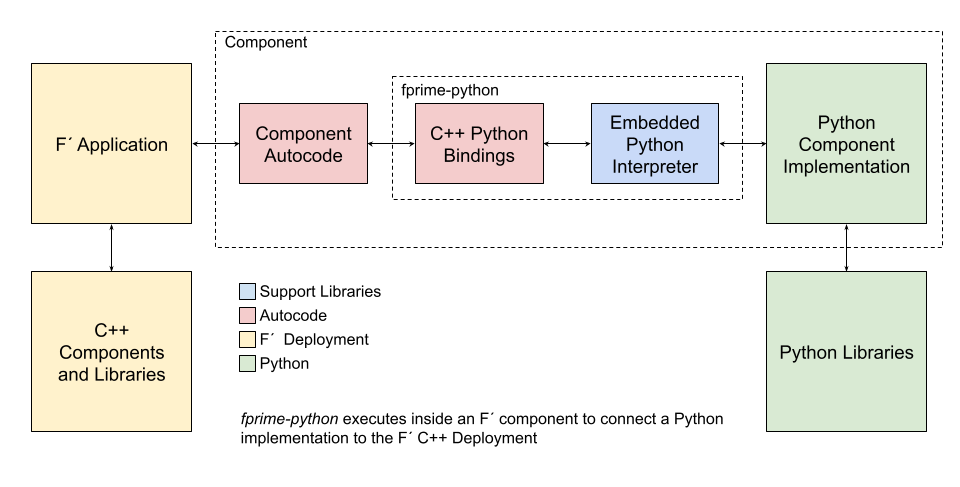
| `fprime-python` works by providing F Prime's topology and components as a module that can be used in Python. Additionally, bindings from C++ to a Python component are automatically generated allowing F Prime to send port calls to a Python implementation. Modeled types, events, telemetry, and commands are all supported. | ||||||
|
|
||||||
| The relationship between the stock F Prime autocode, the generated bindings, and the user-supplied Python implementation is shown below. | ||||||
|
|
||||||
|  | ||||||
|
|
||||||
| ## Project Setup | ||||||
|
|
||||||
| `fprime-python` should use a phased deployment for simplicity. When running `fprime-util new` to create a new deployment, supply the `--phased` flag. | ||||||
|
|
||||||
| ```bash | ||||||
| fprime-util new --deployment --phased | ||||||
| ``` | ||||||
|
|
||||||
| Projects using F Prime python should include [`fprime-python`](https://github.com/fprime-community/fprime-python) as a submodule and list it as an F Prime library in `settings.ini`. | ||||||
|
|
||||||
| Typically libraries are added to the `lib` directory: | ||||||
| ```ini | ||||||
| [fprime] | ||||||
| library_locations = lib/fprime-python:... | ||||||
| ``` | ||||||
|
|
||||||
| Once added, users should install `fprime-python` into their Python environment. | ||||||
|
|
||||||
| ```bash | ||||||
| pip install lib/fprime-python | ||||||
|
Collaborator
There was a problem hiding this comment. Making it clear it's a local path so the error is more meaningful if it's ran elsewhere
Suggested change
|
||||||
| ``` | ||||||
|
|
||||||
| > [!TIP] | ||||||
| > This installation can be done in `requirements.txt`. See the [F Prime Python Reference](https://github.com/fprime-community/fprime-python-reference) for an example. | ||||||
|
|
||||||
| Once installed, `fprime-util new` can be used to create new components once the empty C++ implementations are removed. | ||||||
|
|
||||||
| > [!CAUTION] | ||||||
| > When using `fprime-util new` to create new `fprime-python` components, remove the C++ implementation files from disk, and remove from the `SOURCES` block in the `CMakeLists.txt`. | ||||||
|
|
||||||
| ## Modeling | ||||||
|
|
||||||
| When creating a component in `fprime-python` you must annotate the component with `@fprime-python` on a dedicated line in the component's declaration. | ||||||
|
|
||||||
| ```python | ||||||
| @fprime-python | ||||||
| active component PythonEchoer { | ||||||
| ... | ||||||
| } | ||||||
| ``` | ||||||
|
|
||||||
| Once annotated, component modeling proceeds as normal. For this guide, we will create a component defining a single command: | ||||||
|
|
||||||
| ```python | ||||||
| @ Demonstration of a Python component by echoing a command string | ||||||
| @fprime-python | ||||||
| active component PythonEchoer { | ||||||
| @ Command implemented in Python | ||||||
| async command PYTHON_HELLO(string_argument: string) drop | ||||||
|
|
||||||
| @ Event sent from Python | ||||||
| event HelloEvent(string_argument: string) severity activity high \ | ||||||
| format "A Python says: {}" | ||||||
| } | ||||||
| ``` | ||||||
|
|
||||||
| > [!TIP] | ||||||
| > An fprime component cookiecutter for `fprime-python` components is available: [https://github.com/LeStarch/fprime-python-component-cookiecutter](https://github.com/LeStarch/fprime-python-component-cookiecutter). `fprime-util new --from-source https://github.com/LeStarch/fprime-python-component-cookiecutter` | ||||||
|
|
||||||
| ## Implementation | ||||||
|
|
||||||
| Once a component has been modeled with the `@fprime-python` annotation, build the project to generate a python component template. | ||||||
|
|
||||||
| ```bash | ||||||
| fprime-util generate | ||||||
| fprime-util build | ||||||
| ``` | ||||||
|
|
||||||
| Once completed, a <component>.template.py file will be created in the component directory. After each build, this file will be updated with the latest implementation template (replacing the need for fprime-util impl). | ||||||
|
|
||||||
| Rename this file to <component>.py or copy/past the new contents and implement the component in Python. For example: | ||||||
|
|
||||||
| ```bash | ||||||
| mv PythonEchoer.template.py PythonEchoer.py | ||||||
| ``` | ||||||
|
|
||||||
| Example "echo" implementation: | ||||||
|
|
||||||
| ```python | ||||||
| class PythonEchoer(PythonEchoerBase): | ||||||
| """ Python implementation for the PythonEchoer component """ | ||||||
|
|
||||||
| def PYTHON_HELLO_cmdHandler(self, opCode, cmdSeq, string_argument): | ||||||
| """ Handle the PYTHON_HELLO command """ | ||||||
| return_status = fprime_py.Fw.CmdResponse.T.OK | ||||||
| self.log_ACTIVITY_HI_HelloEvent(string_argument) | ||||||
| self.cmdResponse_out(opCode, cmdSeq, fprime_py.Fw.CmdResponse(return_status)) | ||||||
| ``` | ||||||
|
|
||||||
| > [!CAUTION] | ||||||
| > You can use `__init__` for construction, however; it should be very basic as the F Prime system hasn't been setup at the time of Python object construction. Do NOT attempt to use any F Prime features in `__init__`. | ||||||
|
|
||||||
| Once this is done, add `<component>.py` to the `SOURCES` block in the `CMakeLists.txt` and rebuild the project. | ||||||
|
|
||||||
| ```cmake | ||||||
| register_fprime_component( | ||||||
| AUTOCODER_INPUTS | ||||||
| ${CMAKE_CURRENT_SOURCE_DIR}/PythonEchoer.fpp | ||||||
| SOURCES | ||||||
| ${CMAKE_CURRENT_SOURCE_DIR}/PythonEchoer.py | ||||||
| ) | ||||||
| ``` | ||||||
|
|
||||||
| Update the model, find new implementation templates in `<component>.template.py`, and implement as needed. | ||||||
|
|
||||||
| ## Binding TopologyState | ||||||
|
|
||||||
| The TopologyState struct is defined by the developer of a deployment. As such, it cannot automatically be bound to Python, however; it is necessary to construct this state in Python when interacting with the topology. | ||||||
|
|
||||||
| Thus, we must set up the bindings manually. To do so, add a C++ file to your topology module. For example, `TopologyBindings.cpp`, and develop the bindings for the topology state struct. These bindings **must** be placed in a function with the signature `void setup_user_deployment(pybind11::module_& m)` as this is called by the `fprime-python` module to set up the deployment bindings. Here is an example: | ||||||
|
|
||||||
|
|
||||||
| ```cpp | ||||||
| #include "FprimePython/FprimePython.hpp" | ||||||
| #include "FprimePythonReference/ReferenceDeployment/Top/ReferenceDeploymentTopologyDefs.hpp" | ||||||
|
|
||||||
| // Function used to bind the deployment into Python | ||||||
| void setup_user_deployment(pybind11::module_& m) { | ||||||
| // Bind in the topology state type | ||||||
| pybind11::class_<ReferenceDeployment::TopologyState>(m, "TopologyState") | ||||||
| .def(pybind11::init<>()) | ||||||
| .def_readwrite("hostname", &ReferenceDeployment::TopologyState::hostname) | ||||||
| .def_readwrite("port", &ReferenceDeployment::TopologyState::port); | ||||||
|
Collaborator
There was a problem hiding this comment. It could be good to link to a few specific docs of pybind11 here, or add a bit more details to the guide. I can guess at what's going on, but not much more. |
||||||
| } | ||||||
| ``` | ||||||
|
|
||||||
| > [!NOTE] | ||||||
| > Here we bind the "hostname" and "port" fields. You should change these bindings to match your deployment's topology state struct. | ||||||
|
|
||||||
| ## Instantiation and Deployment Main (Entry Point) | ||||||
|
|
||||||
| Component instantiation in the topology proceeds as normal. No special considerations are needed. | ||||||
|
|
||||||
| ```fpp | ||||||
| instance pythonEchoer: PythonEchoer base id 0x10005000 \ | ||||||
| queue size Default.QUEUE_SIZE \ | ||||||
| stack size Default.STACK_SIZE \ | ||||||
| priority 95 | ||||||
| ``` | ||||||
|
|
||||||
| However, the main function for the deployment is now implemented in Python. This means the user is responsible for writing a main setup function. The standard topology functions `setup` and `teardown` are automatically bound to Python and can be called from the user-supplied main function. | ||||||
|
|
||||||
| Users will typically want to do the following in their main function: | ||||||
|
|
||||||
| 1. Initialize the OSAL layer with `fprime_py.Os.init()` | ||||||
| 2. Call `<deployment>.setup()` to set up the topology | ||||||
| 3. Call `<deployment>.teardown()` on shutdown | ||||||
|
|
||||||
|
|
||||||
|
|
||||||
| ```python | ||||||
| def fsw_main(): | ||||||
| """ Main entry point for the deployment """ | ||||||
| topology_state = fprime_py.TopologyState() | ||||||
| topology_state.hostname = "127.0.0.1" | ||||||
| topology_state.port = 50000 | ||||||
| fprime_py.Os.init() | ||||||
| try: | ||||||
| fprime_py.ReferenceDeployment.setup(topology_state) | ||||||
| except KeyboardInterrupt: | ||||||
| print("[INFO] CTRL-C received, shutting down F Prime") | ||||||
| except Exception as e: | ||||||
| print(f"[ERROR] Failed to start F Prime: {e}") | ||||||
| fprime_py.ReferenceDeployment.teardown(topology_state) | ||||||
| print("[INFO] F Prime shutdown complete") | ||||||
|
|
||||||
| if __name__ == "__main__": | ||||||
| fsw_main() | ||||||
| ``` | ||||||
|
|
||||||
| > [!TIP] | ||||||
| > The reference deployment provides a complete example of a [main function](https://github.com/fprime-community/fprime-python-reference/blob/main/FprimePythonReference/ReferenceDeployment/fsw_main.py). This uses `PythonRateGroupDriver` and as such starts the rate groups in python. | ||||||
|
|
||||||
| ## Testing | ||||||
|
|
||||||
| Unit testing for Python components is not yet supported. Testing may use the integration test framework to test at the system level. | ||||||
|
|
||||||
| ## References | ||||||
|
|
||||||
| - [F Prime Python Reference](https://github.com/fprime-community/fprime-python-reference) | ||||||
| - [F Prime Python](https://github.com/fprime-community/fprime-python) | ||||||
| - [Pybind11](https://pybind11.readthedocs.io/en/stable/) | ||||||

Oops, something went wrong.
Add this suggestion to a batch that can be applied as a single commit.
This suggestion is invalid because no changes were made to the code.
Suggestions cannot be applied while the pull request is closed.
Suggestions cannot be applied while viewing a subset of changes.
Only one suggestion per line can be applied in a batch.
Add this suggestion to a batch that can be applied as a single commit.
Applying suggestions on deleted lines is not supported.
You must change the existing code in this line in order to create a valid suggestion.
Outdated suggestions cannot be applied.
This suggestion has been applied or marked resolved.
Suggestions cannot be applied from pending reviews.
Suggestions cannot be applied on multi-line comments.
Suggestions cannot be applied while the pull request is queued to merge.
Suggestion cannot be applied right now. Please check back later.
There was a problem hiding this comment.
Choose a reason for hiding this comment
The reason will be displayed to describe this comment to others. Learn more.
typo somewhere?